Your first play takes about a minute
Movement, screens, passes and a coaching note on every step.
There is no second drawing tool to learn
Drag a player, add a step, and the play saves as you go. Nothing to install and nothing to set up, so the first play is done in about a minute. Then print a copy for the fridge, send a link to an assistant, or drop the play straight onto Tuesday's practice sheet.
-
01
Drag a player, and the step is drawn
Entry, the action, the reversal, the finish. Drag a player to the spot and the step is drawn, so a full play is a few minutes rather than an evening.
-
02
Your whiteboard notation, not a new language
Five on the floor in basketball, six on the court in volleyball, eleven on the field in field hockey. Both teams on the floor in every frame, drawn the way you already draw them, so nobody has to be taught how to read your plays.
-
03
The coaching note sits on the step it explains
Not in a paragraph underneath. Hand the play to an assistant in November and the reason the screener waits a beat is right there on the frame, without a phone call to you.
-
04
One page, the whole book, or a link
Print one play for the fridge, the whole playbook in one job for the binder, or send a PDF. Printing is included on every plan.
Draw the play before you forget it!
The set you thought of on the drive home does not survive the week.
- Drawing a set you saw another team run on Friday
- Turning a clip off film into a diagram you can hand out
- Printing the install so it is on the fridge before Tuesday
- Sending a play to the assistant who missed practice
One tool for each job
Every play your team runs, in the order you teach it, printed as one book.
- The plays are in four places.
- One playbook per team, or per season, or per side of the ball. A play lives in one book and you drag it into the order you install it.
- I printed the wrong version again.
- Print the whole book in one job. Every play, every step, one card each, in your order, with the play name on the card.
- The new assistant needs everything by Tuesday.
- Print the book once and hand it over, or save it as a PDF and send the file. Every play, every step, one card each.
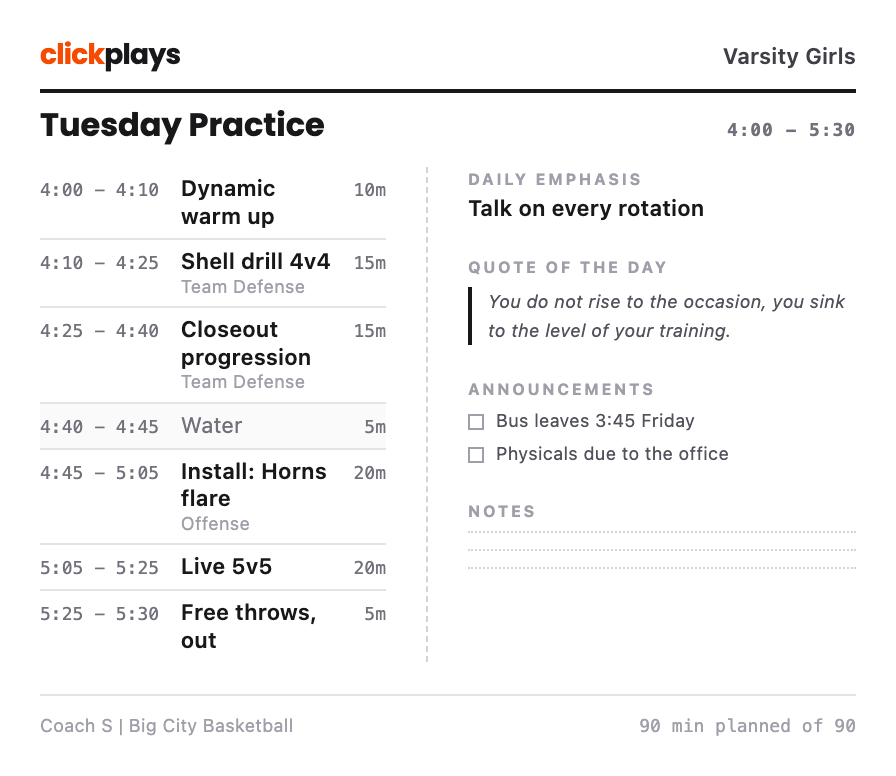
Plan a practice that fits the gym time you actually have, then print the sheet that runs it.
- We ran out of time again.
- Every block gets minutes, and the running total sits against your practice window. The plan tells you it is long before the gym does.
- What was that drill called?
- A block points at a drill from your bank, and the drill brings its diagram and coaching points onto the printed sheet with it.
- I rebuilt last week from scratch.
- Copy the plan and change one block. Tuesday takes minutes when last Tuesday is already there.
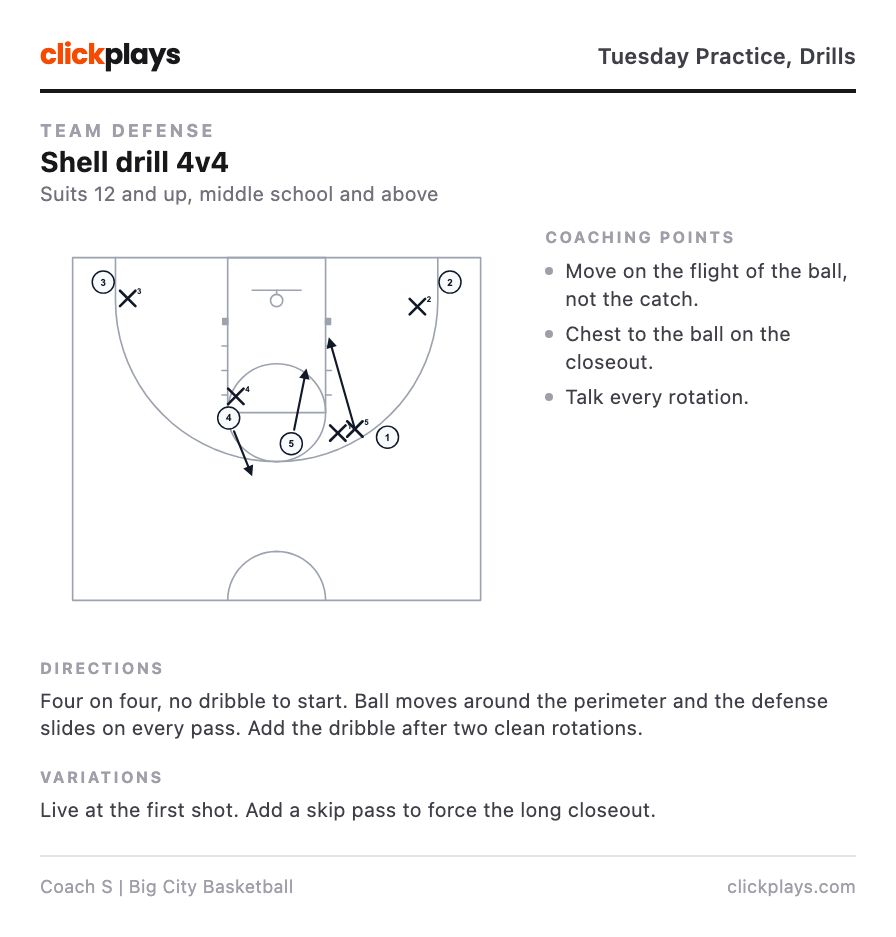
Keep a drill with its diagram attached, so you explain it once instead of every season.
- I explain this one every single time.
- The drill keeps its diagram, so an assistant reads it instead of asking you.
- Which version did we run last year?
- Variations live with the parent drill instead of turning into four near-identical entries in a list.
- Is this right for 8-year-olds?
- Each drill carries the age group and team level it suits, as a floor rather than a bracket.
Frequently asked questions
How many steps can one play have?
Can I print a whole playbook at once?
Do my plays stay private?
Is there anything to install?
What happens to my plays if I stop paying?
Draw a play today
Draw a few plays. They are saved, and they are there every season you coach.
Start drawingSeven days free, and printing is included on every plan.
