Practice planner for coaches
Minutes add up against the gym time you booked, drills attached.
The practice planner adds up your minutes against the gym time you booked
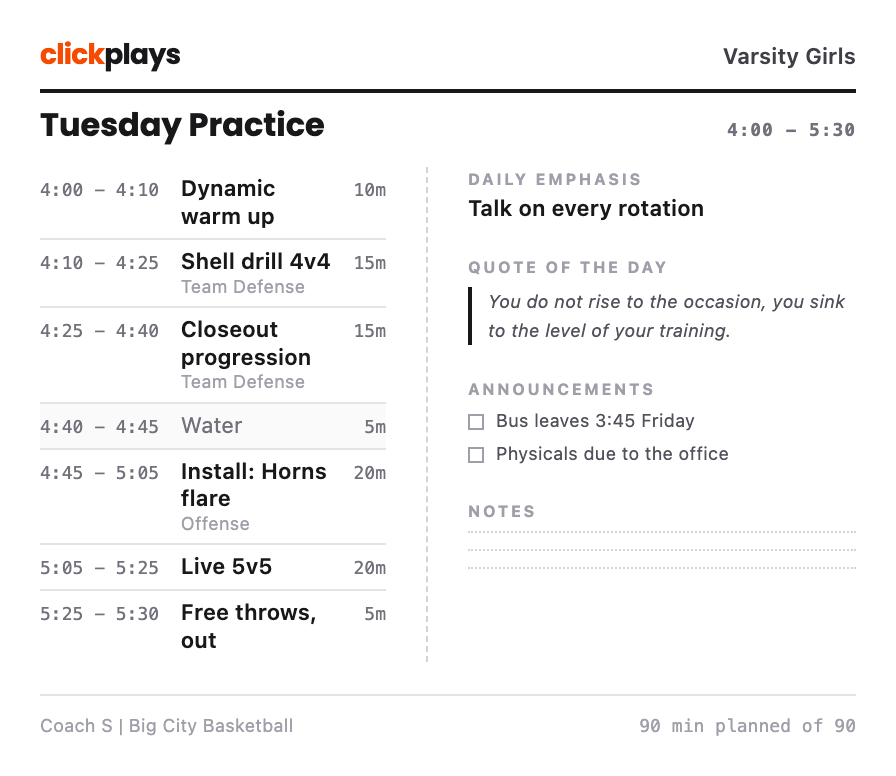
You lay out blocks with real minutes on your practice plan, attach a drill where a block needs one, and the running total sits against the gym time you actually booked. When the practice runs long the planner tells you on Monday night rather than at 5:40 on Tuesday, which is the only time you can still move a block.
-
01
Ten minutes over, and the total says so
Every line on the schedule carries its own minutes, and the total is measured against the 4:00 to 5:30 you booked. Your install keeps its twenty minutes instead of losing them to a warm up that ran long.
-
02
Every drill brings its diagram onto the sheet
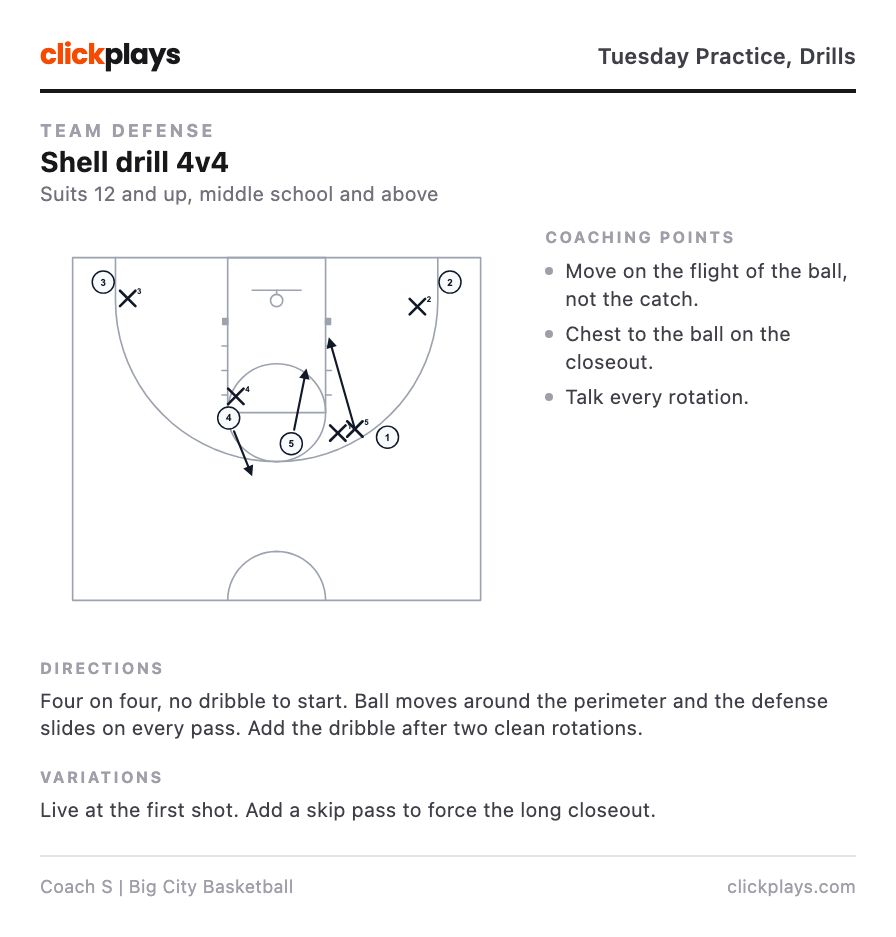
You drop Shell drill 4v4 into the 4:10 slot, and the printed sheet carries the diagram, the three coaching points and the directions you wrote when you saved the drill. An assistant reads the sheet instead of asking you.
-
03
Practice planning on one page, and in your pocket
Schedule on the left, resources on the right, with a fold down the middle. Announcements, the daily emphasis and room for notes are already printed on the page.
-
04
Rewrite the drill in January, November still says what you ran
When you finalise a practice, the directions and coaching points are copied onto the sheet and frozen there. Change the drill four months later and the old plan is untouched, so a season of practices is a record of what you actually ran.
Usually the night before
And usually later than you meant.
- Planning Tuesday when last Tuesday is a good starting point
- Handing an assistant a sheet instead of an explanation
- Keeping a season of practices you can look back through
- Making sure your install gets its twenty minutes, not whatever is left
One tool for each job
Every play your team runs, in the order you teach it, printed as one book.
- The plays are in four places.
- One playbook per team, or per season, or per side of the ball. A play lives in one book and you drag it into the order you install it.
- I printed the wrong version again.
- Print the whole book in one job. Every play, every step, one card each, in your order, with the play name on the card.
- The new assistant needs everything by Tuesday.
- Print the book once and hand it over, or save it as a PDF and send the file. Every play, every step, one card each.
Draw a play your team can actually read, one step per beat instead of twelve arrows on one picture.
- They ran it wrong on Tuesday.
- A play runs three to six steps, and each step shows only what moves on that beat. Nobody has to decode the whole play at once.
- I cannot remember why we set that screen.
- The coaching point sits on the frame it explains, not in a paragraph underneath. It is still there in November.
- My assistant missed practice.
- One play to a page, a whole playbook in one job, or a PDF. Printing is included on every plan.
Keep a drill with its diagram attached, so you explain it once instead of every season.
- I explain this one every single time.
- The drill keeps its diagram, so an assistant reads it instead of asking you.
- Which version did we run last year?
- Variations live with the parent drill instead of turning into four near-identical entries in a list.
- Is this right for 8-year-olds?
- Each drill carries the age group and team level it suits, as a floor rather than a bracket.
Frequently asked questions
Does it store player names or contact details?
Can I print the practice plan or save it as a PDF?
Can I reuse last week without rebuilding it?
Do I have to fill in every block?
Can I see what we actually worked on this season?
Plan Tuesday tonight
Build one practice and print it. The sheet is yours whether you ever build a second one or not.
Start drawingSeven days free. The sheet prints on every plan.
